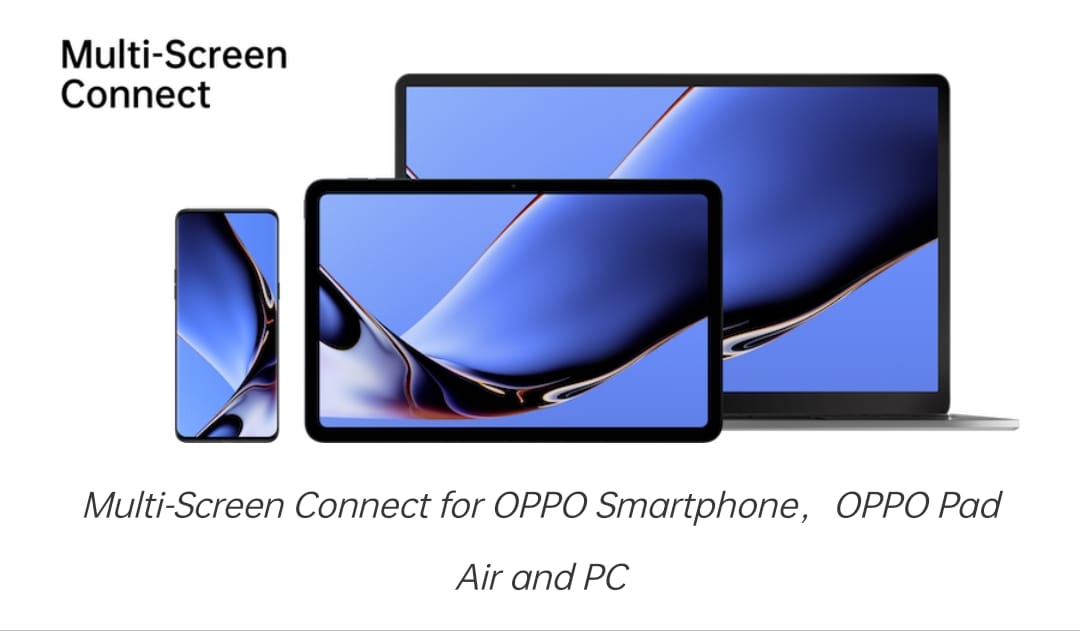
Managing multiple devices can sometimes feel like a juggling act, especially when you need to keep track of emails, messages, and files across different screens. OPPO’s Multi-Screen Connect feature is here to make that task easier by linking your OPPO smartphone with your computer. This guide will walk you through connecting and using Multi-Screen Connect in a way that feels straightforward and helpful.
What is OPPO Multi-Screen Connect?
Imagine being able to control your phone right from your computer—handling notifications, transferring files, and responding to messages without having to switch devices constantly. That’s what OPPO Multi-Screen Connect offers. It lets you connect your OPPO phone to your PC or laptop, turning your phone into an extended part of your computer setup.
What You’ll Need
Here’s a quick checklist of what you need to get started:
An OPPO Smartphone: Running ColorOS 11 or later.
A Computer: With Windows 10 or later.
OPPO Multi-Screen Connect App: On your phone.
OPPO PC Companion Software: Installed on your computer.
A Stable Wi-Fi Connection: Both devices should be connected to the same network.
Step 1: Install OPPO Multi-Screen Connect on Your Smartphone
Download the App:
Open the Google Play Store on your OPPO phone.
Search for “OPPO Multi-Screen Connect” and tap install.
Open the App:
Once the app is installed, launch it and follow any on-screen instructions to set it up.
Step 2: Install OPPO PC Companion on Your Computer
Download the Software:
Visit the OPPO official website or a trusted download site to get the OPPO PC Companion for Windows.
Install the Software:
Run the installer and follow the steps to set up the software on your computer.
Launch the Software:
Open OPPO PC Companion after installation.
Step 3: Connect Your Devices
Open the App on Your Phone:
Start the Multi-Screen Connect app on your OPPO smartphone.
Open OPPO PC Companion on Your Computer:
Open the companion software on your PC.
Pair Devices:
On your phone, tap the “Connect” button in the Multi-Screen Connect app.
On your computer, you’ll either see a QR code or be asked to enter a pairing code.
If you see a QR code, use your phone’s app to scan it.
Confirm the Connection:
Follow any additional instructions to complete the pairing. You should see a confirmation message on both devices.
Step 4: Using OPPO Multi-Screen Connect
File Transfer:
From PC to Phone: Drag and drop files into the OPPO PC Companion interface to send them to your phone.
From Phone to PC: Use the app on your phone to select and upload files to your computer.
Manage Notifications:
View Notifications: Check and interact with your phone’s notifications from your computer.
Customize Alerts: Choose which notifications you want to receive and how they should appear.
Respond to Messages:
Read and Reply: View and respond to text messages directly from your PC, making it easier to keep up with conversations.
Control Your Phone:
Access Phone Functions: Use your computer to control apps and settings on your phone.
Screen Mirroring:
View Your Phone Screen: See your phone’s display on your computer for easier management and interaction.
Troubleshooting Tips
Devices Not Connecting:
Check that both devices are on the same Wi-Fi network.
Restart both your phone and computer, and try connecting again.
Ensure the Multi-Screen Connect app and OPPO PC Companion are up-to-date.
File Transfer Problems:
Verify that cables and connections (if any) are secure and that there’s enough storage space on both devices.
Notification Issues:
Make sure notifications are enabled in the Multi-Screen Connect app and that permissions are correctly set on your phone.
Extra Tips for Getting the Most Out of Multi-Screen Connect
Keep Your Software Updated:
Regularly check for updates to both the app and the companion software to enjoy the latest features and fixes.
Organize Your Workspace:
Set up your computer’s desktop to make it easy to use Multi-Screen Connect effectively. Arrange your screens and windows to maximize productivity.
Explore Features:
Take time to explore all the features of Multi-Screen Connect. You might find new ways to use it that enhance your workflow even further.
In Summary
OPPO Multi-Screen Connect is a fantastic tool for making your digital life smoother and more integrated. By following this guide, you can easily set up and use Multi-Screen Connect to enhance your productivity and simplify managing tasks across your devices.
If you run into any issues or have questions, OPPO’s support resources are there to help you out. Enjoy the convenience of having your phone and computer working together seamlessly!